
来自 yoyolife 的投稿。
目前的资料收集情况来说,只有中国电信可以开通外网IP。另外,不能使用80端口。如果你要80就不用往下看了。
我的开通过程是。微信找到中国电信公众号,找到客服,和他说你要开通IP回退(公网IP),他问你必须的验证资料后,然后等那个半天。电信小哥会到你的社区里面,把你的网口从一个盒子换到另外一个盒子,然后他会打电话给你。你重启一下。进入路由,看到的外网的ip,和你去baidu 打 ip 看到的ip是一样的了。如果不这么做,你得到的只是一个大局域网的ip。外面是不能访问的。
当你有了外网ip。然后你就要开始设置你的光猫和路由器。我用的是TPLink路由,你们用啥基本上是大同小异。
我们要做的事情是,关闭光猫的自动拨号功能,用路由器来拨号。现在默认光猫出厂,就能自己上网,因为光猫会自动帮你拨号了。我们要换成自己的路由器拨号,并开启DMZ公开你的树莓派到网外。
进入192.168.0.1 进入超级管理员
username=”telecomadmin”
web_passwd=”nE7jA%5m”
然后到 网络-宽带设置 把你拨号模式改成Bridge模式VLAN ID 设为41 如图

然后进入你的路由器192.168.1.1 进入WAN设置,使用PPPoE拨号
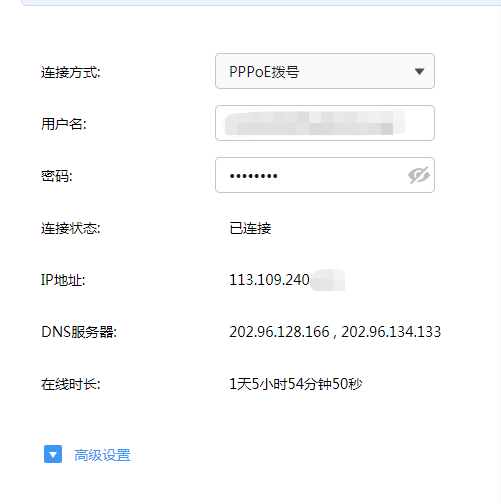
这个时候,你的IP和你外网的IP是一样了。
然后进去DMZ主机
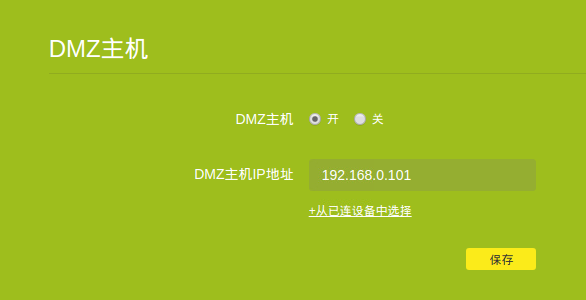
把树莓派内网地址写上去。
这个时候,你用你的外网IP 就能进入SSH
重点来了。现在你要设置DDNS让你的域名当IP改变时可以自己绑定新的IP
登陆阿里云后
进入 https://ram.console.aliyun.com/users RAM 访问控制
新建立用户给权限

把这4个权限选上。然后开始跑我下面的python代码
先安装
pip3 install aliyunsdkcore
pip3 install aliyun-python-sdk-alidns
# coding: utf-8
from aliyunsdkcore.client import AcsClient
from aliyunsdkalidns.request.v20150109.DescribeSubDomainRecordsRequest import DescribeSubDomainRecordsRequest
from aliyunsdkalidns.request.v20150109.AddDomainRecordRequest import AddDomainRecordRequest
from aliyunsdkalidns.request.v20150109.UpdateDomainRecordRequest import UpdateDomainRecordRequest

import time
import json
import urllib.request

##这里要换成自己的哟
client = AcsClient('AccessKey ID', 'Access Key', 'cn-hangzhou')

def get_internet_ip():
    with urllib.request.urlopen('http://www.3322.org/dyndns/getip') as response:
        html = response.read()
        ip = str(html, encoding='utf-8').replace("\n", "")
    return ip

def Describe_SubDomain_Records(client,record_type,subdomain):
    request = DescribeSubDomainRecordsRequest()
    request.set_accept_format('json')

    request.set_Type(record_type)
    request.set_SubDomain(subdomain)

    response = client.do_action_with_exception(request)
    response = str(response, encoding='utf-8')
    relsult = json.loads(response)
    return relsult


def add_record(client,priority,ttl,record_type,value,rr,domainname):
    request = AddDomainRecordRequest()
    request.set_accept_format('json')

    request.set_Priority(priority)
    request.set_TTL(ttl)
    request.set_Value(value)
    request.set_Type(record_type)
    request.set_RR(rr)
    request.set_DomainName(domainname)

    response = client.do_action_with_exception(request)
    response = str(response, encoding='utf-8')
    relsult = json.loads(response)
    return relsult


def update_record(client,priority,ttl,record_type,value,rr,record_id):
    request = UpdateDomainRecordRequest()
    request.set_accept_format('json')

    request.set_Priority(priority)
    request.set_TTL(ttl)
    request.set_Value(value)
    request.set_Type(record_type)
    request.set_RR(rr)
    request.set_RecordId(record_id)

    response = client.do_action_with_exception(request)
    response = str(response, encoding='utf-8')
    return response

def wirte_to_file(path,ip):
    f = open(path, 'w')  # 若是'wb'就表示写二进制文件
    f.write(ip)
    f.close()

def domains(domain):
    try:
        des_relsult = Describe_SubDomain_Records(client, "A", domain['full'])
        # 判断子域名解析记录查询结果,TotalCount为0表示不存在这个子域名的解析记录,需要新增一个
        if des_relsult["TotalCount"] == 0:
            add_relsult = add_record(client, "5", "600", "A", ip, domain['left'], domain['right'])
            record_id = add_relsult["RecordId"]
            print("域名解析新增成功!")
        # 判断子域名解析记录查询结果,TotalCount为1表示存在这个子域名的解析记录,需要更新解析记录,更新记录需要用到RecordId,这个在查询函数中有返回des_relsult["DomainRecords"]["Record"][0]["RecordId"]
        elif des_relsult["TotalCount"] == 1:
            record_id = des_relsult["DomainRecords"]["Record"][0]["RecordId"]
            update_record(client, "5", "600", "A", ip, domain['left'], record_id)
            print("域名解析更新成功!")
        else:
            record_id = 0
        path = './RecordId'
        wirte_to_file(path, record_id)
    except Exception as e:
        print(e)
while True:
    ip = get_internet_ip()
    with open("./ip", 'r') as f:
        old_ip = f.read()

    if ip == old_ip:
        print("noupdate" + "\nnew_ip:" + ip + "\nold_ip:" + old_ip)
    else:
        wirte_to_file("./ip", ip)

##多个域名
        domains({'full':"*.tunnel.xxx.fun",'left':"*.tunnel","right":"xxx.fun"})
        domains({'full':"tunnel.xxx.fun",'left':"tunnel","right":"xxx.fun"})
        domains({'full':"*.frp.xxx.fun",'left':"*.frp","right":"xxx.fun"})


    time.sleep(10)
保存为 ddns.py 文件
在同级目录输入
touch ip
touch RecordId
然后运行
python3 ddns.py
就会每10秒刷新一次ip 有改变就会去修改ddns
然后你可以把py放到supervisor里面守护
也可以放到 /etc/rc.local启动运行
也可以放到后台进程
nuhup python3 ddns.py &
守护这东西我就不详细说了。
这样你就有了 全速的网络,你可以做 NAS 或网盘 或什么你喜欢。
来自 yoyolife 的投稿,出处:http://www.yoyolife.fun:9000/blog/post/5e0d9acd9b86720030000154

我擦,要公网ip这么容易的嘛。。。。
越来越难的,而且据传上海地区家宽用域名乱指会被封网。。。
那我还是用我的frp吧…….
frp不能全速,你服务只有1m的话,你只有100多k的上传
你的python程序太重了,根本没必要使用阿里云的sdk,只需要10行自己就能实现签名逻辑
show me the code
不推荐开启DMZ。建议使用路由器的端口转发,用那个端口开那个。所有端口暴露在公网上树莓派很容易遭受攻击,Pi上的无认证的服务也容易被滥用
这是我写的根据阿里云的签名规则,传一大堆参数进去(包括阿里云的key等等),自动生成一个可以直接使用request库调用的URL出来,根本没必要用他的sdk @yoyolife
def ali_Signature(string):
str_text=”
string.sort()
for i in string:
str_key=quote(i.split(‘=’)[0],’utf-8′)
str_value=quote(i.split(‘=’)[1],’utf-8′)
str_text=str_text+f'{str_key}={str_value}&’
StringToSign=’GET&%2F&’+quote(str_text[:-1],’utf-8′)
ali_sign=hmac.new((a.Secret+’&’).encode(),StringToSign.encode(),sha1).digest()
ali_sign=base64.b64encode(ali_sign)
ali_sign=quote(str(ali_sign,’utf-8′))
url=’https://alidns.aliyuncs.com/?’+str_text+’Signature=’+ali_sign
return(url)
参数格式能发一下吗
小城市表示联通也有公网ip,而且都没主动申请
请问大神我的宽带猫打开您所说的功能无法宽带拨号(网络-宽带设置 把你拨号模式改成Bridge模式VLAN ID 设为41 )不开启可以拨号··目前公网IP已经正常
80可以的吧,我就试过公网用域名访问80端口啊
而且我切公网ip 直接打了10000就可以了,没有小哥上门牙
##多个域名
domains({‘full’:”*.tunnel.xxx.fun”,’left’:”*.tunnel”,”right”:”xxx.fun”})
domains({‘full’:”tunnel.xxx.fun”,’left’:”tunnel”,”right”:”xxx.fun”})
domains({‘full’:”*.frp.xxx.fun”,’left’:”*.frp”,”right”:”xxx.fun”})
这个要换成自己的域名吗?看不明白,怎么写自己的?
公网IP这么麻烦么?我联通打个客服电话说我玩游戏必须使用公网IP,然后挂了电话分分钟就换成公网IP了。
玩游戏必须公网IP哈哈哈哈哈哈
弱弱的问一下,我这联通独享带宽都是公网IP。为什么你还要去申请?莫非是小区宽带?
这里的公网ip也是会经常换掉,不是指固定ip对吧?所以,才需要监控ip,如果ip换了,就需要重新绑定dns。是这个意思吗?
狗爹的
url = ‘https://api.godaddy.com/v1/domains/{}/records/A/{}’.format(‘.’.join(hostnames[1:]),hostnames[0])
data = json.dumps([ { “data”: ip, “ttl”: args.ttl, “name”: hostnames[0], “type”: “A” } for ip in ipslist])
if sys.version_info > (3,): data = data.encode(‘utf-8′)
req = Request(url, method=’PUT’, data=data)
ipv6的公网地址绑定ddns应该也是一个思路吧
花生壳啊
tplink的ddns服务自带域名
tailscale 了解下?