
本文将手把手教你如何用树莓派开发板搭建一个的 AI 人脸检测系统,从准备工作到模型识别、代码讲解,再到最终效果展示,你还可以自己外接摄像头模块,基于此来实现一个人脸识别系统。
项目介绍
准备工作:包括所需 Python 环境以及软件包的安装部署等;
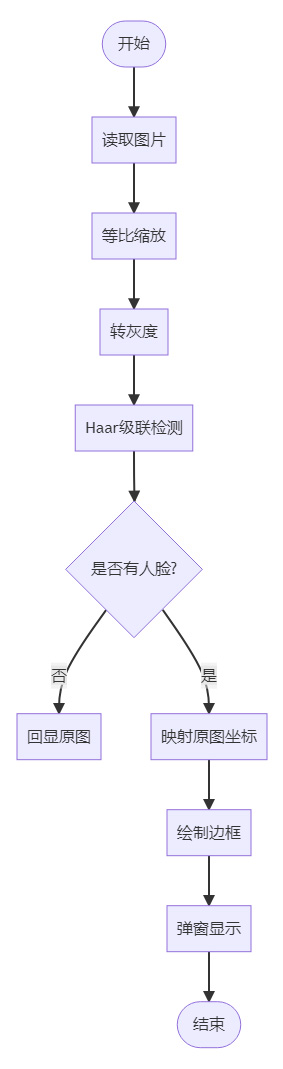
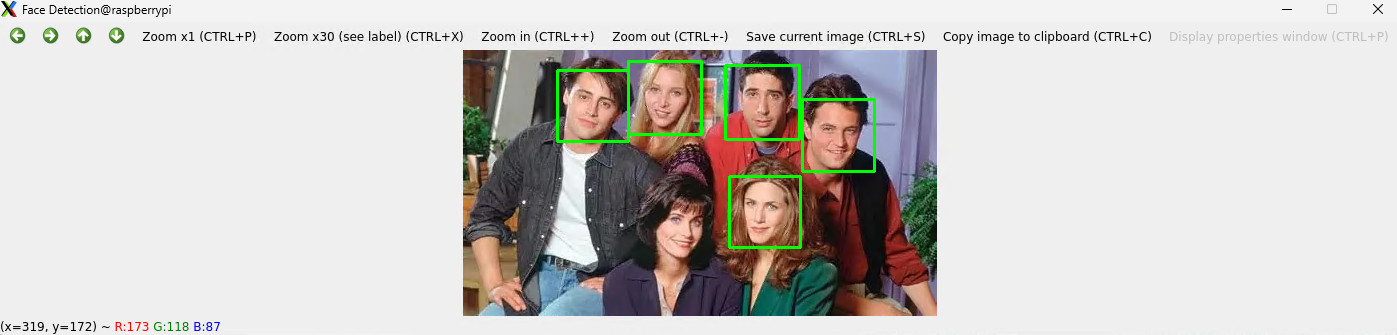
Haar 级联:使用 OpenCV 自带的数据库实现 Haar 级联检测人脸;
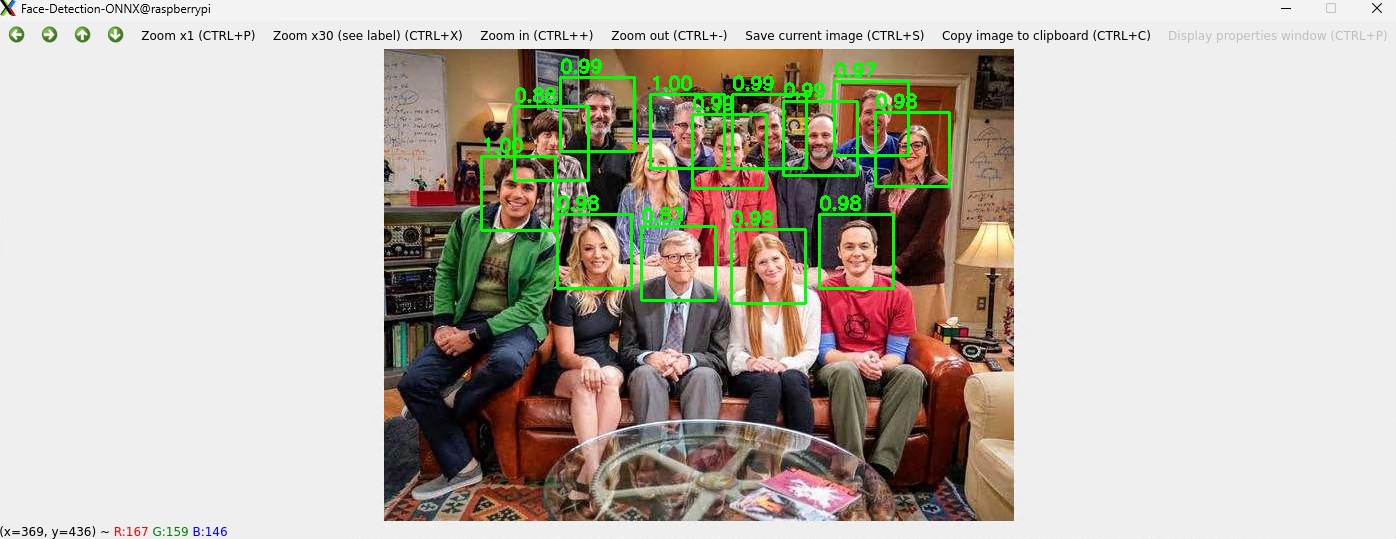
ONNX 模型:使用 RetinaFace 、YuNet 等轻量化 ONNX模型实现人脸检测的板端推理。
准备工作
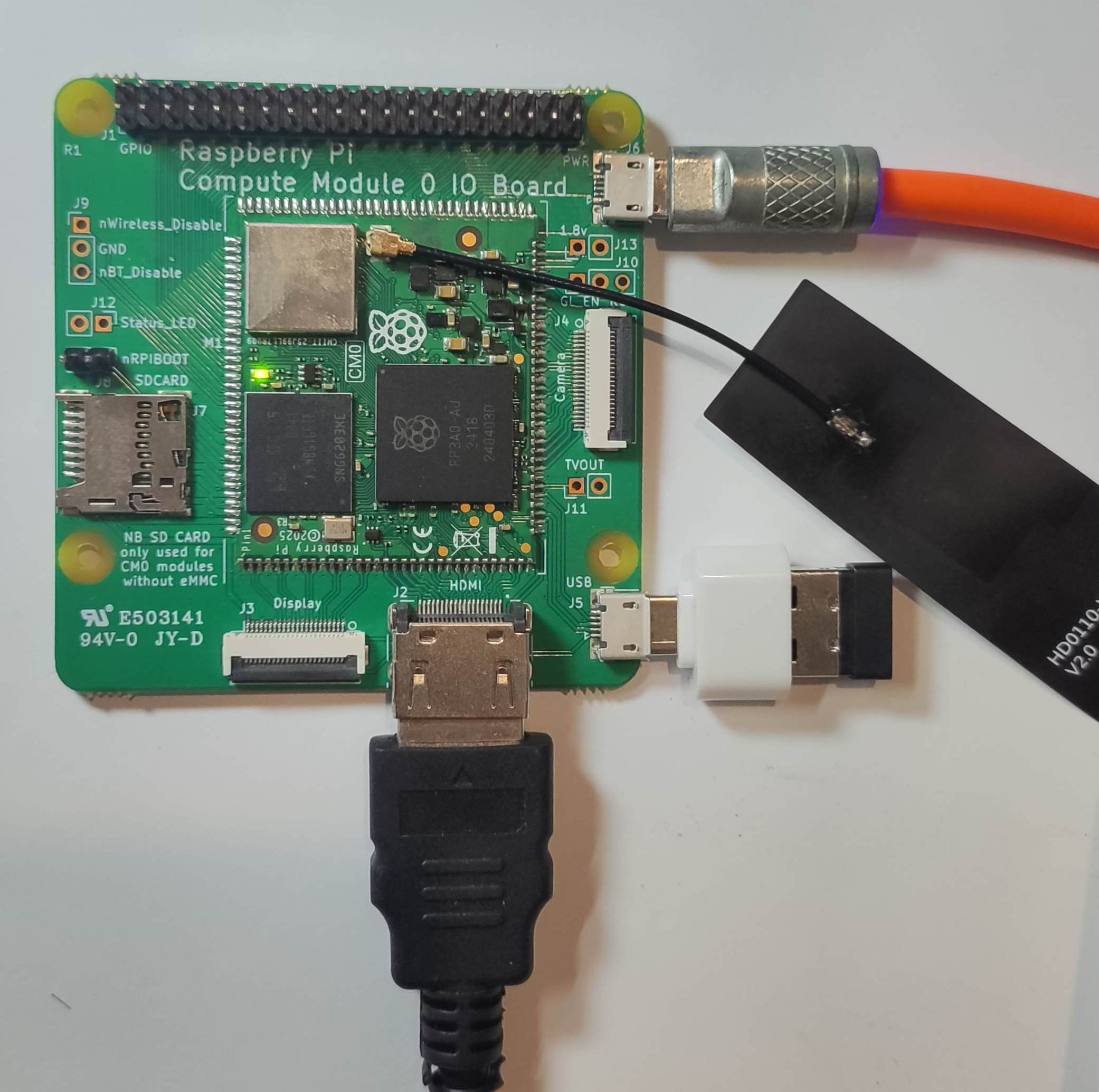
任何型号的树莓派开发板,本文所用的是树莓派 CM0 开发套件。
库安装
执行指令 sudo apt install python3-opencv 安装 OpenCV
https://github.com/opencv/opencv

执行指令 sudo apt install opencv-data 补全 OpenCV 库

或 下载 模型文件至本地 ./model 文件;
https://github.com/ultralytics/yolov5/releases/download/v7.0/yolov5n.onnx
mkdir model
cd model
wget https://github.com/opencv/opencv/blob/4.x/data/haarcascades/haarcascade_frontalface_default.xml
流程图
编程
执行 touch fd_xml.py 指令新建文件,并使用 nano 文本编辑器添加如下代码
import cv2
from pathlib import Path

def detect_faces(image_path: str,
                 max_side: int = 1280,
                 padding: float = 0.05) -> None:
    """
    零切割人脸检测
    :param image_path:  原图路径
    :param max_side:    检测前最长边上限(越大越慢,越小越可能漏)
    :param padding:     矩形向外扩的边距比例(0.05 = 5 %)
    """
    # 1. 读图
    img = cv2.imread(image_path)
    if img is None:
        raise FileNotFoundError(image_path)
    h0, w0 = img.shape[:2]

    # 2. 等比例缩放
    scale = min(1.0, max_side / max(h0, w0))
    if scale < 1.0:
        img_small = cv2.resize(img, (int(w0 * scale), int(h0 * scale)),
                               interpolation=cv2.INTER_LINEAR)
    else:
        img_small = img
    h1, w1 = img_small.shape[:2]

    # 3. 灰度 + 检测
    gray = cv2.cvtColor(img_small, cv2.COLOR_BGR2GRAY)
    cascade_path = "/usr/share/opencv4/haarcascades/haarcascade_frontalface_default.xml"
    #cascade_path = Path(cv2.__file__).parent / "data" / "haarcascade_frontalface_default.xml"
    face_cascade = cv2.CascadeClassifier(cascade_path)
    #face_cascade = cv2.CascadeClassifier(str(cascade_path))
    faces = face_cascade.detectMultiScale(
        gray,
        scaleFactor=1.1,
        minNeighbors=7,
        minSize=(60, 60)
    )

    # 4. 映射回原图 + 边缘修正
    for (x, y, w, h) in faces:
        # 映射回原图坐标
        x = int(x / scale)
        y = int(y / scale)
        w = int(w / scale)
        h = int(h / scale)

        # 外扩边距
        dw = int(w * padding)
        dh = int(h * padding)
        x = max(0, x - dw)
        y = max(0, y - dh)
        x2 = min(w0, x + w + 2 * dw)
        y2 = min(h0, y + h + 2 * dh)

        cv2.rectangle(img, (x, y), (x2, y2), (0, 255, 0), 2)

    # 5. 显示
    max_h = 500                        # 高度不超过 500 px
    if h0 > max_h:
        scale_show = max_h / h0
        new_w = int(w0 * scale_show)
        show_img = cv2.resize(img, (new_w, max_h))
    else:
        show_img = img

    cv2.namedWindow("Face Detection", cv2.WINDOW_AUTOSIZE)
    cv2.imshow("Face Detection", show_img)
    cv2.waitKey(0)
    cv2.destroyAllWindows()

if __name__ == "__main__":
    detect_faces(r"./img/friends.jpg")
保存代码。
效果
终端执行 python fd_xml.py 弹窗显示人脸检测结果。
ONNX 模型
Open Neural Network Exchange (ONNX) 是一个开放的生态系统,为 AI 开发人员提供支持 随着项目的发展选择正确的工具。https://onnx.ai/
ONNX 为 AI 模型(包括深度学习和传统 ML)提供开源格式。它定义了一个可扩展的计算图模型,以及内置运算符和标准的定义 数据类型。
详见:https://github.com/onnx/onnx
这里使用 ONNX 模型实现人脸检测。
准备工作 – 库安装
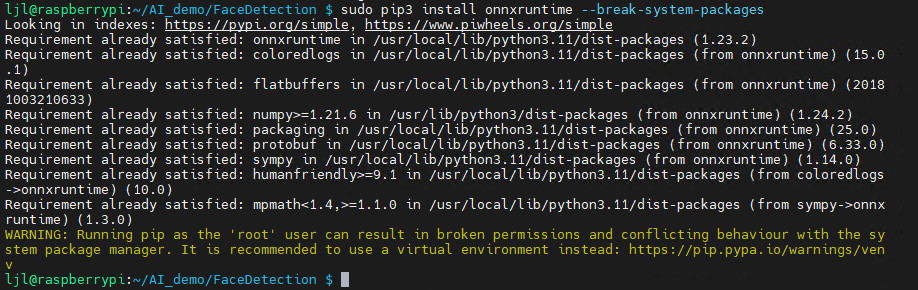
安装解析 ONNX 模型所需的 onnxruntime 库,终端执行
sudo apt install python3-pip
sudo pip3 install onnxruntime --break-system-packages
安装完成。
模型下载
可实现人脸检测的模型有许多,这里选择轻量化的 RetinaFace 模型。
新建 model 文件夹,并拉取训练好的 ONNX 模型,终端执行代码
mkdir model
cd model
wget https://github.com/Linzaer/Ultra-Light-Fast-Generic-Face-Detector-1MB/blob/master/models/onnx/version-RFB-320.onnx
也可获取更多模型。
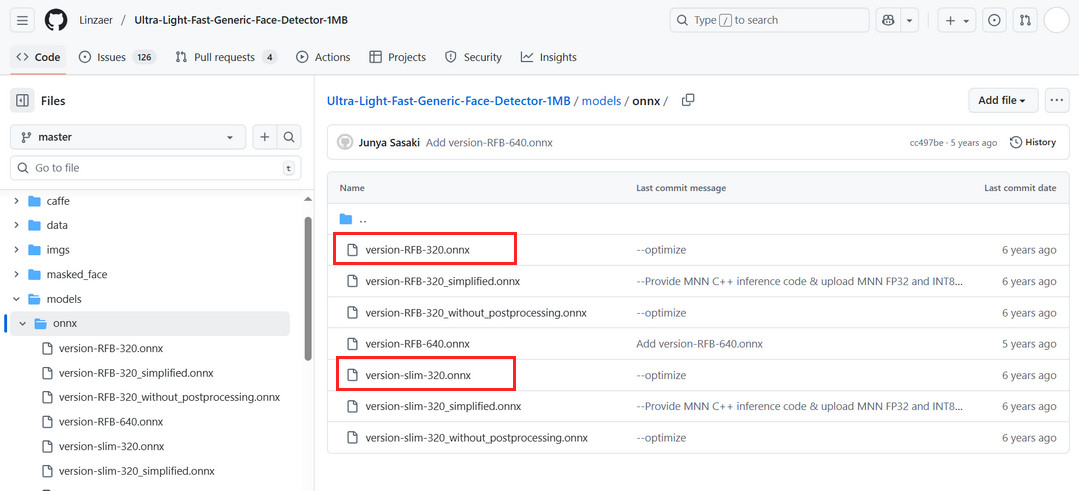
详见:https://github.com/Linzaer/Ultra-Light-Fast-Generic-Face-Detector-1MB
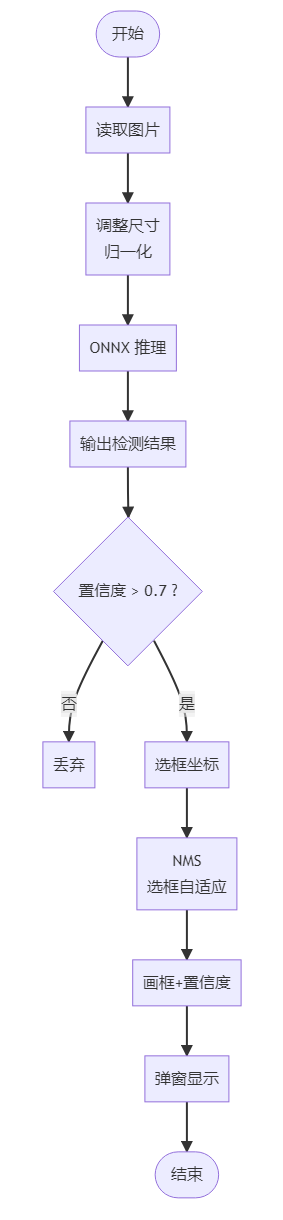
流程图
编程
执行 touch fd_onnx.py 指令新建文件,并使用 nano 文本编辑器添加如下代码
import cv2
import numpy as np
import onnxruntime as ort
import os

def correct_face_detection(model_path, image_path):
    """正确的UltraFace检测实现"""

    # 加载模型
    session = ort.InferenceSession(model_path, providers=['CPUExecutionProvider'])
    input_name = session.get_inputs()[0].name

    # 读取图片
    image = cv2.imread(image_path)
    if image is None:
        print(f"无法读取图片: {image_path}")
        return []

    orig_h, orig_w = image.shape[:2]
    print(f"原始图片尺寸: {orig_w}x{orig_h}")

    # 预处理
    resized = cv2.resize(image, (320, 240))
    input_tensor = resized.astype(np.float32) / 255.0
    input_tensor = input_tensor.transpose(2, 0, 1)
    input_tensor = np.expand_dims(input_tensor, axis=0)

    # 推理
    outputs = session.run(None, {input_name: input_tensor})
    scores, boxes = outputs

    print(f"输出形状 - scores: {scores.shape}, boxes: {boxes.shape}")

    # 处理检测结果 - 使用更严格的过滤
    all_faces = []

    for i in range(scores.shape[1]):
        face_score = scores[0, i, 1]  # 人脸置信度

        # 提高置信度阈值,减少误检
        if face_score > 0.9:  # 从0.7提高到0.9
            box = boxes[0, i]

            # UltraFace输出是相对坐标 [0,1] 范围
            x1 = int(box[0] * orig_w)
            y1 = int(box[1] * orig_h)
            x2 = int(box[2] * orig_w)
            y2 = int(box[3] * orig_h)

            width = x2 - x1
            height = y2 - y1

            # 更严格的尺寸过滤
            if width > 40 and height > 40 and width < 300 and height < 300:
                all_faces.append([x1, y1, x2, y2, face_score])

    print(f"高质量候选框: {len(all_faces)} 个")

    # 改进的NMS去重
    def nms(boxes, scores, iou_threshold=0.4):
        """非极大值抑制"""
        if len(boxes) == 0:
            return []

        # 按分数排序
        order = np.argsort(scores)[::-1]
        keep = []

        while order.size > 0:
            i = order[0]
            keep.append(i)

            if order.size == 1:
                break

            # 计算IoU
            xx1 = np.maximum(boxes[i, 0], boxes[order[1:], 0])
            yy1 = np.maximum(boxes[i, 1], boxes[order[1:], 1])
            xx2 = np.minimum(boxes[i, 2], boxes[order[1:], 2])
            yy2 = np.minimum(boxes[i, 3], boxes[order[1:], 3])

            w = np.maximum(0.0, xx2 - xx1)
            h = np.maximum(0.0, yy2 - yy1)
            inter = w * h

            area_i = (boxes[i, 2] - boxes[i, 0]) * (boxes[i, 3] - boxes[i, 1])
            area_other = (boxes[order[1:], 2] - boxes[order[1:], 0]) * (boxes[order[1:], 3] - boxes[order[1:], 1])
            iou = inter / (area_i + area_other - inter)

            # 保留IoU小于阈值的框
            inds = np.where(iou <= iou_threshold)[0]
            order = order[inds + 1]

        return keep

    if all_faces:
        # 转换为numpy数组以便NMS计算
        boxes_array = np.array([[x1, y1, x2, y2] for x1, y1, x2, y2, score in all_faces])
        scores_array = np.array([score for x1, y1, x2, y2, score in all_faces])

        # 应用NMS
        keep_indices = nms(boxes_array, scores_array, 0.4)

        final_faces = []
        for idx in keep_indices:
            x1, y1, x2, y2, score = all_faces[idx]
            final_faces.append([x1, y1, x2, y2, score])

        print(f"去重后剩余 {len(final_faces)} 张人脸")

        # 显示结果 - 简化显示逻辑
        result_image = image.copy()

        # 检查图片数据
        print(f"结果图片信息: shape={result_image.shape}, dtype={result_image.dtype}")
        print(f"像素值范围: {result_image.min()} - {result_image.max()}")

        # 如果图片是全黑的,重新创建
        if result_image.max() == 0:
            print("检测到黑色图片,重新创建...")
            result_image = image.copy()

        # 绘制人脸框和置信度
        for i, (x1, y1, x2, y2, score) in enumerate(final_faces):
            color = (0, 255, 0)  # 绿色
            thickness = 2

            # 绘制矩形框
            cv2.rectangle(result_image, (x1, y1), (x2, y2), color, thickness)

            # 简化标签显示
            label = f"{score:.3f}"
            cv2.putText(result_image, label, (x1, y1 - 10),
                       cv2.FONT_HERSHEY_SIMPLEX, 0.5, color, 1)

            print(f"人脸 {i+1}: 位置({x1}, {y1}, {x2-x1}, {y2-y1}), 置信度: {score:.3f}")

        # 显示图片 - 修复显示问题
        try:
            # 检查图片是否有效
            if result_image is not None and result_image.size > 0 and result_image.max() > 0:
                # 创建窗口并显示
                window_name = f"人脸检测结果 - {len(final_faces)} faces"
                cv2.namedWindow(window_name, cv2.WINDOW_NORMAL)
                cv2.imshow(window_name, result_image)
                print("显示检测结果中... 按任意键关闭窗口")
                cv2.waitKey(0)
                cv2.destroyAllWindows()
            else:
                print("错误: 结果图片数据无效或全黑")
                # 显示原图作为备用
                cv2.imshow("原始图片", image)
                cv2.waitKey(0)
                cv2.destroyAllWindows()

        except Exception as e:
            print(f"显示图片时出错: {e}")
            # 保存图片到文件作为备用
            output_path = "debug_result.jpg"
            cv2.imwrite(output_path, result_image)
            print(f"结果已保存到: {output_path}")

        return final_faces
    else:
        print("未检测到人脸")
        # 显示原图
        cv2.imshow("原始图片", image)
        cv2.waitKey(0)
        cv2.destroyAllWindows()
        return []

def main():
    model_path = "./model/version-slim-320.onnx"
    image_path = "./img/friends.jpg"

    if not os.path.exists(model_path):
        print(f"模型文件不存在: {model_path}")
        return

    if not os.path.exists(image_path):
        print(f"图片文件不存在: {image_path}")
        return

    print("开始人脸检测...")
    faces = correct_face_detection(model_path, image_path)

    if faces:
        print(f"\n 最终检测到 {len(faces)} 张人脸")
    else:
        print(f"\n 未检测到人脸")

if __name__ == "__main__":
    main()
保存代码。
终端执行 python fd_onnx.py 弹窗显示人脸检测结果。
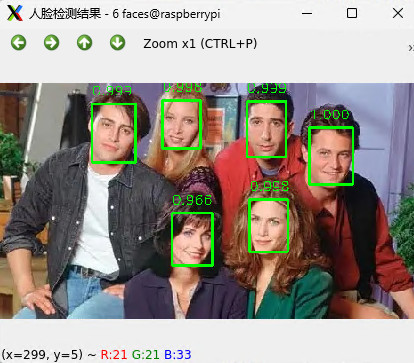
同时终端输出识别信息。
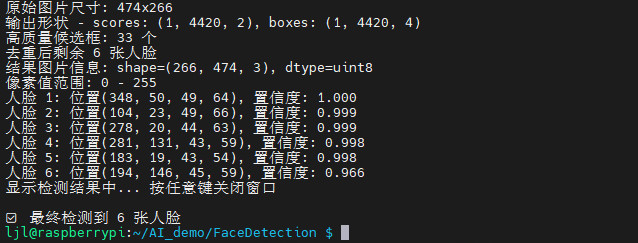
为了更加轻量化,简化上述 ONNX 模型处理代码,如下:
#!/usr/bin/env python3
import cv2
import numpy as np
import onnxruntime as ort
from pathlib import Path

MODEL_PATH = "model/version-slim-320.onnx"   # 240×320 模型
IMG_PATH   = "img/friends.jpg"

# ---------- 1. 加载模型 ----------
sess = ort.InferenceSession(MODEL_PATH, providers=['CPUExecutionProvider'])
in_name = sess.get_inputs()[0].name   # [1,3,240,320]
out_score = sess.get_outputs()[0].name  # [1,N,2]
out_box   = sess.get_outputs()[1].name  # [1,N,4]  x1,y1,x2,y2 归一化

# ---------- 2. 读图 ----------
img0 = cv2.imread(IMG_PATH)
if img0 is None: raise FileNotFoundError(IMG_PATH)
h0, w0 = img0.shape[:2]

# ---------- 3. 预处理(exact 240×320 + FP32) ----------
blob = cv2.resize(img0, (320, 240))          # 宽 320,高 240
blob = blob.astype(np.float32) / 255.0
blob = blob.transpose(2, 0, 1)[None]         # NCHW

# ---------- 4. 推理 ----------
scores, boxes = sess.run([out_score, out_box], {in_name: blob})
scores = np.squeeze(scores)[:, 1]            # 人脸置信度 [N]
boxes  = np.squeeze(boxes)                   # 归一化框 [N,4]

# ---------- 5. NMS 去重 + 自适应框 ----------
conf_thres = 0.7
nms_iou    = 0.3
rel_size   = 0.12                            # 框边长 = 0.12×图像宽

# 先过滤低置信
keep = scores > conf_thres
boxes, scores = boxes[keep], scores[keep]

# OpenCV NMSBoxes 需要 [x,y,w,h] + 分数
nms_boxes = []
for b in boxes:
    x1, y1, x2, y2 = b
    w_box = int((x2 - x1) * w0)              # 真实像素宽
    h_box = int((y2 - y1) * h0)              # 真实像素高
    nms_boxes.append([int(x1 * w0), int(y1 * h0), w_box, h_box])

if nms_boxes:
    indices = cv2.dnn.NMSBoxes(nms_boxes, scores.tolist(), score_threshold=conf_thres, nms_threshold=nms_iou)
    for idx in indices.flatten():
        x, y, w, h = nms_boxes[idx]
        # 自适应框:以检测框为中心,用相对尺寸画框
        cx = x + w // 2
        cy = y + h // 2
        side = int(rel_size * w0)              # 统一边长
        x1 = max(0, cx - side // 2)
        y1 = max(0, cy - side // 2)
        x2 = min(w0, cx + side // 2)
        y2 = min(h0, cy + side // 2)

        cv2.rectangle(img0, (x1, y1), (x2, y2), (0, 255, 0), 2)
        cv2.putText(img0, f"{scores[idx]:.2f}", (x1, max(5, y1 - 5)),
                    cv2.FONT_HERSHEY_SIMPLEX, 0.6, (0, 255, 0), 2)

# ---------- 6. 弹窗 ----------
cv2.imshow("Face-Detection-ONNX", img0)
cv2.waitKey(0)
cv2.destroyAllWindows()
保存代码。运行代码,可更快速地获得人脸检测效果。
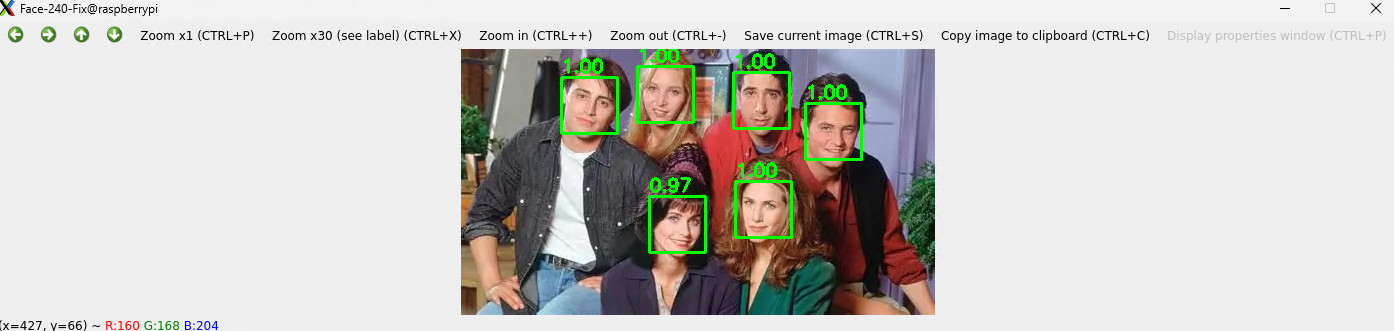

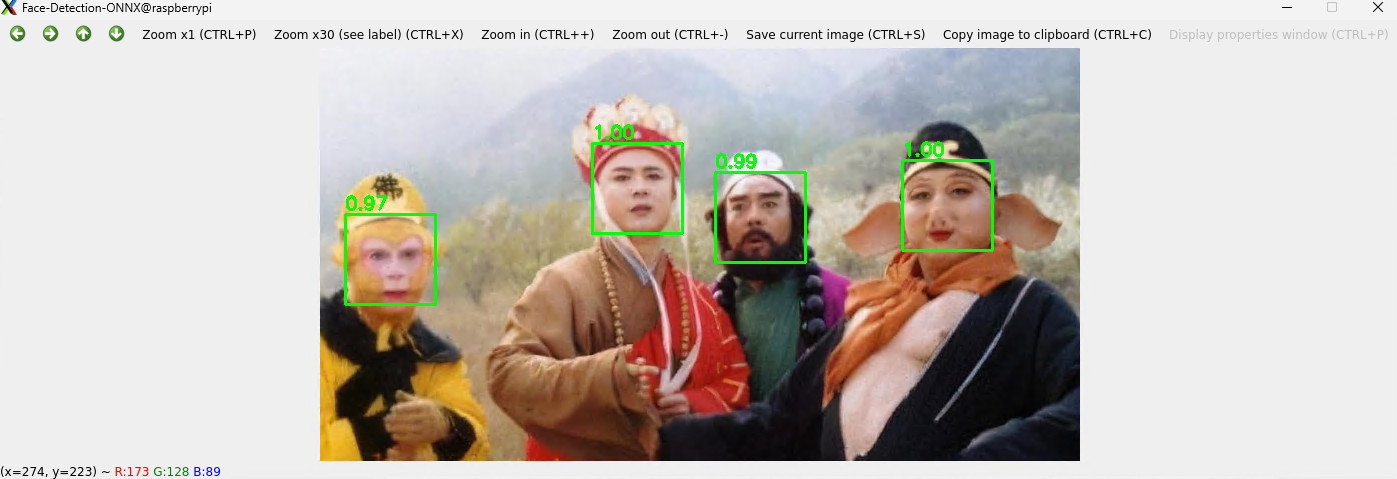
相关模型详见:https://bgithub.xyz/xuguowong/rknn_model_zoo-RKNN/
代码打包下载:FaceDetection
发表评论